PL

You pay companies
for systems nobody checks

A single computer in a practice, an office with a dozen workstations, a company with several branches or a building full of cameras and automation — everywhere something is running that nobody checks on a regular basis. We look at the whole: computers, servers, network and security. We deploy and maintain a set of proven, free tools, bring them together in one view on our map, and regularly send you a report: what works, and what needs to be done where. The same system watches over our own fleet of devices.

Where the problem usually comes from

Four things that recur regardless of company size and hardware brand.

A complaint instead of an alert You learn about an outage from users, not from the system. By the time someone calls, the problem has been going on for tens of minutes.
Documentation from deployment day The network description was written once and has not changed since, although the network has changed many times.
Deadlines nobody remembers Expiring certificates and devices held back by too little power from the switch — both become visible only when someone looks.
Clocks that drifted apart A camera, a recorder and a switch each log events by their own clock. When each shows a different time, recordings and logs do not add up to one story.

Who it is for

For anyone responsible for IT systems — from the owner of a small business with one computer, through an IT department, to the manager of a building full of devices.

Small business, practice, office. Even a single computer is worth watching: are its patches up to date, is the backup running, is the antivirus on, is the disk filling up. You learn about a problem from the report, not on the day the computer stops working.

A company with an IT department or an external IT provider. We add one consistent picture instead of several dashboards: network, servers, workstations and security events in one place, with a report that can be passed on — including to someone who does not deal with IT every day.

Multiple sites. Branches, warehouses, shops — each site has its own collector, and everything is visible on one map.

Buildings and facilities. Where systems are maintained by several companies — cameras, access control, network, automation — each sees its own part, and a device that stops responding easily falls into the gap between them. We show what works and since when it does not — without replacing anyone.

You usually get in touch at one of a few moments: a change of IT provider or service company, a new installation or a move, the end of a warranty, taking over a company or a building, an outage that cost money. That is when the question of what actually works and whether it is secured stops being theoretical.

One monitoring standard — for every client

We do not split monitoring into tiers. Every deployment gets the same set of tools, and every deployment gets the map — not just the top package. Scope differs by the number of devices and locations, not by what you get to see.

Zabbix — network, servers and computers Switches, access points, cameras, recorders, controllers and power, as well as servers and computers: availability, load, disks, services, internet link, certificates. An alert when something stops working — or is about to.
Wazuh — security Logs from servers, computers and network devices in one place: failed logins, changes to important system files, suspicious events. VirusTotal is integrated with it (see below).
Pi-hole with Unbound — DNS under control Your own name server inside your network: it blocks advertising, tracking and known malicious domains, and shows which device is trying to reach them. It sees domain names, not traffic content — and only for devices that use it; equipment with a hard-coded external or encrypted DNS bypasses it.
ESET with its console — endpoint protection Antivirus protecting computers and servers in real time. In the package we deploy it together with its management console and connect its detections to the rest of the system.
NetDoc map — everything in one view Devices and the links between them, on your floor plan when one is available. Next to each device you see what all the tools know about it at once.
Periodic report Weekly, or at whatever interval you choose: what works, and what needs to be done where — see what the report looks like.

The tools complement each other

Zabbix tells you a server is up, but not who logged into it — Wazuh sees that. Wazuh notices a new file in a system folder, and VirusTotal and ESET decide whether it is malware. Pi-hole shows which computer tried to reach a malicious domain. The map joins these pieces: one device, one picture, instead of five separate dashboards.

Everything except ESET and the VirusTotal service is open-source, free software. Data is collected by a collector installed at your site and stays with you — the exceptions are file hashes sent to VirusTotal and what ESET sends to the vendor's cloud. The report is produced at your site, and a copy reaches us only with your consent. We deploy, maintain and update the tools — and any administrator knows them and can take over if needed.

VirusTotal does not replace your antivirus — and it does not have to

VirusTotal is a public service in which dozens of antivirus engines assess the same file. In our standard, Wazuh uses it. Wazuh watches selected, important locations in the system — system folders, autostart, directories that installers usually write to. When its next scan finds a new or changed file there (scan frequency is set during deployment), Wazuh computes its hash and asks VirusTotal whether any engine knows it as malware. If so, an alert appears in the security console and in the report, with the computer name, the file path and the number of engines that flagged it.

Only the file hash is sent to VirusTotal — not the file itself or its contents.

ESET works differently: it protects in real time — it blocks and removes threats on the computer. VirusTotal blocks nothing. It is a second, independent opinion: if something slipped past one antivirus, one of dozens of others often recognises it.

How deep we can see into the wireless network depends on what the vendor's controller exposes — one shows the connection quality of every device and failed logins, another only their count. We check this in the first conversation and tell you plainly what will be visible before we start.

We agree the scope and price before work starts — never afterwards, and with no surcharges appearing along the way. The effort depends on the number of devices, computers and locations, and — for the map on a floor plan — on the state of the plans. That is why we start with a conversation about your network, not with a price list.
What happens when something stops working

An alert is worth as much as the path it travels. We agree that path before go-live, not after the first outage.

We agree the recipient before the start: who gets the message, on which channel and at what hours. A different person for a link failure, a different one for a camera — because two different companies are usually responsible for them.

An alert carries a description of the state, not just "not responding": what stopped working, since when, and what else it affects. An indicator without that description makes people phone around to find out what actually happened.

What we do next is written into the contract. From a notification alone, through checking on our side, to repair — scope and hours are agreed with you before go-live. We do not promise a response time we cannot keep.

Alerts are grouped together. Seven ports that reported a fault within an hour after the network came back are one event, not seven. Separated, they would send a technician looking for seven cables.

A weekly report: what to update, and where

We monitor not only the network, but also servers and computers. Once a week — or at another agreed interval — you get a short report on the state of your systems and security.

Who it is for For the IT department, or for an owner or manager who wants to know how things stand without logging into several systems.
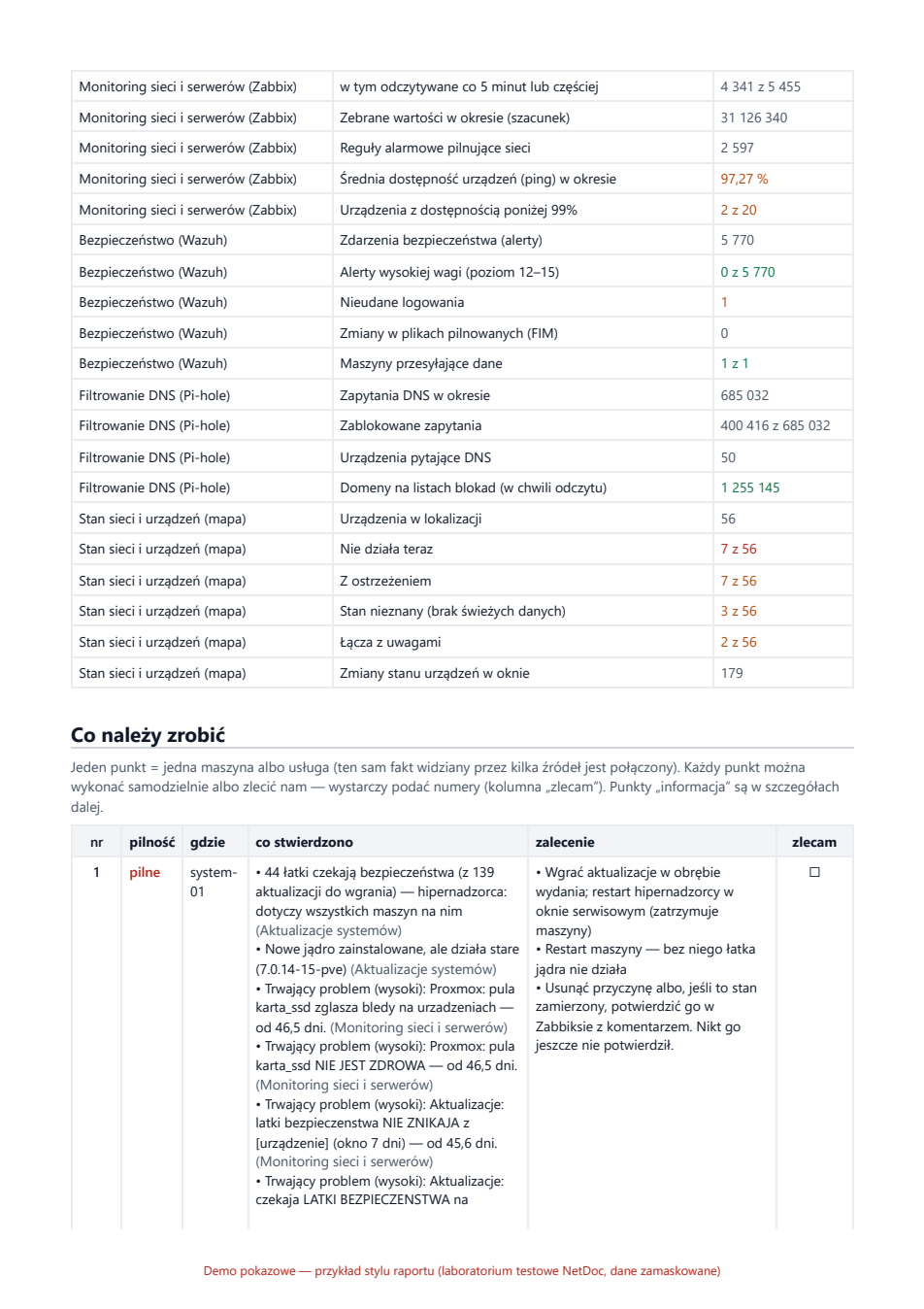
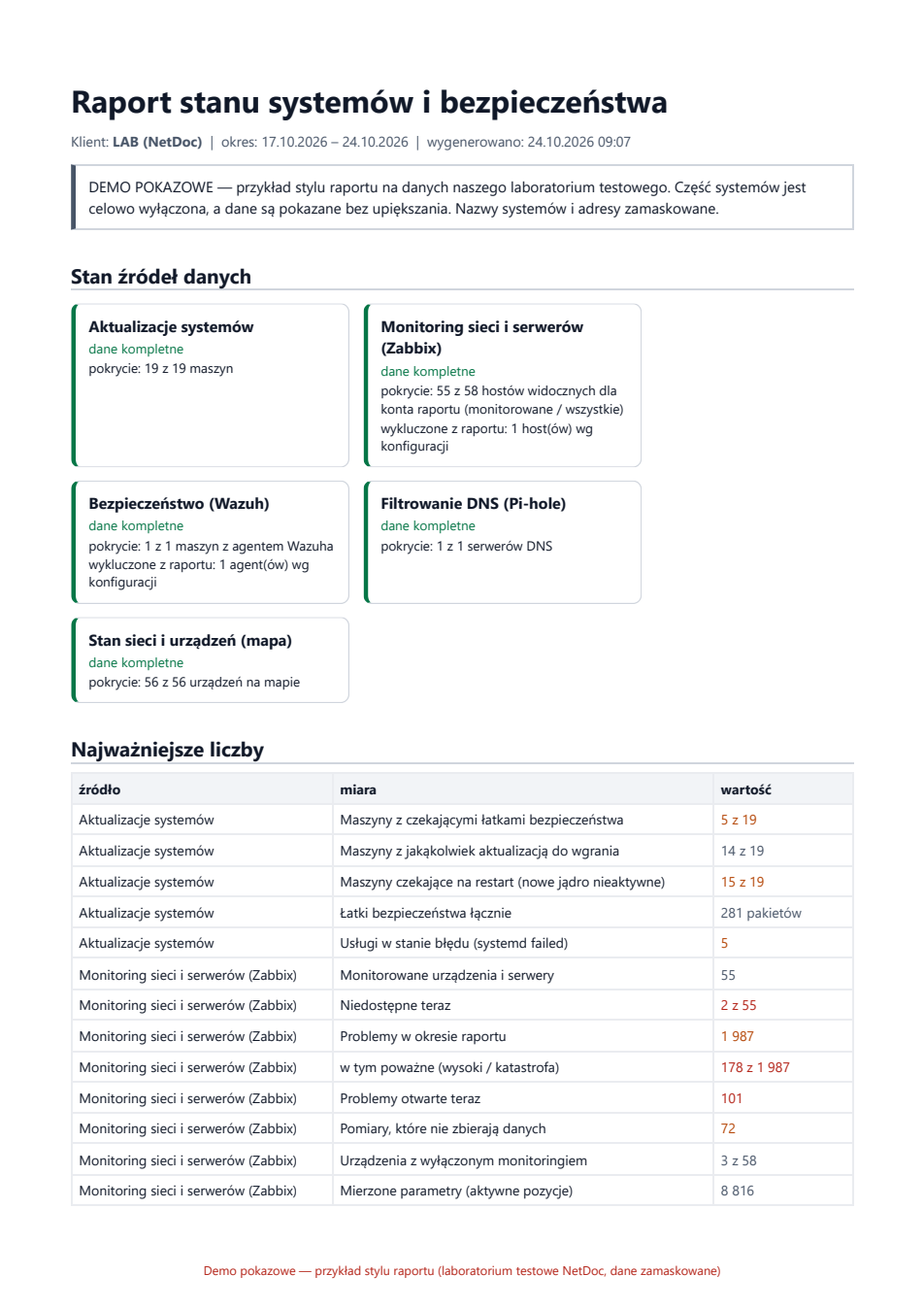
What is in it Missing security patches, machines waiting for a restart, devices that stopped working, security alerts — each item with where it is and what to do.
Who does the work You can do it yourselves from the list, or have us handle selected items — just tick them in the report. We do the work in an agreed maintenance window.
No pretending When a source does not respond, the report says "no data", not "all fine". Every number carries the time it was read.

Sample report

The first two pages of a report from our lab — a test environment where we leave faults in place on purpose. System names and addresses are masked. The report itself is in Polish; reports for clients can be prepared in English.

Download the full sample (PDF, in Polish)

This is not a mock-up. It is running now.

The map behind this link shows a real network — our own fleet of devices, live, with the same data a client gets. There are no sample numbers and no staged demo. You can click and check.

Open the live map →
Screenshot of the public map view: the NetDoc lab with switches, cameras, access points and links; two devices marked red as unreachable and without data

This is the map a visitor sees — our lab, in its real state at the moment of the screenshot. The red labels are actual faults, not decoration.

An independent witness to what happens on the air

A wireless controller describes itself, and monitoring repeats what the controller told it. We add to the map an instrument that asks nobody's opinion: a passive sensor listening on all bands.

A foreign device started impersonating our network — alert after seven seconds. A network switched from encrypted to open is a classic step before eavesdropping — we detected it in under six. We measured both numbers with a clock, on our own equipment.

The same day we found a gap on our side. Disconnecting people one device at a time does not raise an alert, because our detector counts floods of attempts, not single ones. We would rather state it than wait for someone else to find it.

Silence on a dashboard is a question, not an answer. Three of our instruments went quiet on the same day, and each silence meant something different. We described that day in full, mistakes included.

Monitoring shows zero threats. How do you know it is looking? (in Polish) →

Where the limits are

The sensor sweeps the bands one after another, so we read every number from it as at least this many. "Not seen" is not the same as "not there".

A measurement from one point tells you what can be heard at that point — not in the whole building.

It is a supplementary source. The sensor does not see cables, ports, power from the switch or device uptime; the rest of the monitoring does that.

Today it stands in our network. At your site we install it on request, and what it collects stays with you.

What we write

Three kinds of text from the same work. Cases say what we found in networks. Guides — how to operate equipment. The catalogue — what we can read from a given device.

Supported equipment

Panel drawings and a full list of parameters each device exposes — including those we do not use ourselves. A list of capabilities, not an inventory: equipment is here because we can read it, not because it stands in some network.

What we can read →

Cases

Findings from the networks we look after: the symptom, the measurement that settled it, and how to check it on your own network. We describe the pattern, not the network — without company names or addresses.

What we find in networks (in Polish) →

Guides

Written from runs on powered-up devices, not from translated datasheets. Where we have not checked something, it says so plainly. Wireless networks, switches, and also building energy and automation.

Cisco Mobility Express · UniFi networks · PV installation with storage

All guides (in Polish) →

Beyond monitoring

Monitoring is what we sell. But since we get to know your network anyway, we also do the things clients ask about most often — consulting and service: from a wireless network audit to upgrades. Adding access points where coverage is missing, separating the guest network from the corporate one, moving to sign-in where every employee has their own login instead of one shared password for the whole company.

We build virtualisation and backups on Proxmox VE — with an emphasis on testing the restore instead of assuming it will work. A backup nobody has ever restored is only a hope.

We also resell network and server equipment, tested before shipping. We will advise what makes sense at your scale — including when the answer is "do not buy this". We configure access points at our place: you send them to us, they come back ready to plug in, with no technician visit and no remote access to your network.

We also wipe devices being retired from the network. A switch, access point or firewall keeps its configuration, Wi-Fi passwords, certificates and keys — and the hardware then goes to an auction or a reseller with all of that on board. We erase it before retirement, with a record and serial numbers. A factory reset does not always remove everything, so we check the device afterwards.

None of this has a price list, because the scope varies too much. A short conversation is enough — we will tell you what can be done and how long it will take before we start anything.

Contact

Call

Radosław Skonieczny

+48 602 642 402

[email protected]

We speak Polish and English.

Company details

NET PLUS Radosław Skonieczny

ul. Warszawska 2H lok. 37
05-825 Grodzisk Mazowiecki
Poland

VAT ID PL9511958766

Online

Live map

LinkedIn — NetDoc.pl

LinkedIn — Radosław Skonieczny